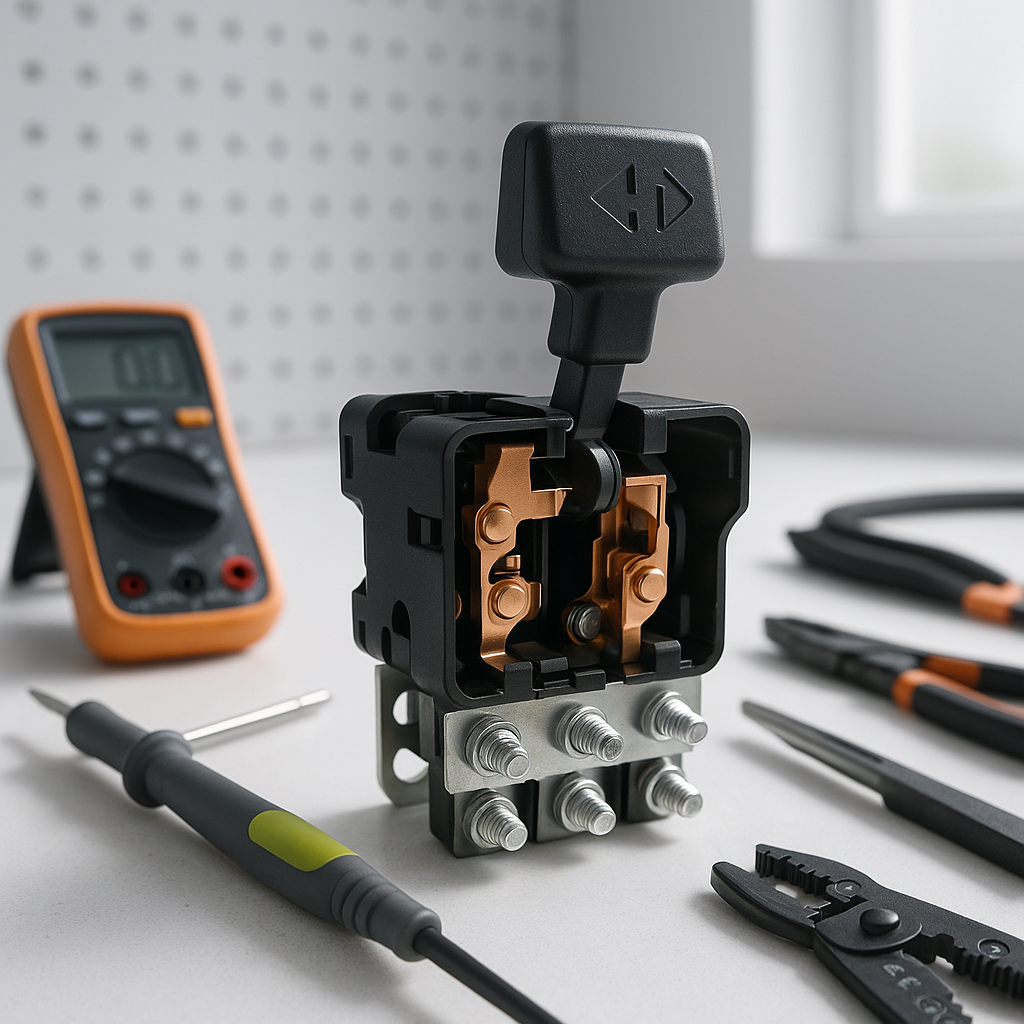
The forward/reverse switch — sometimes called the F&R switch or direction switch — is one of the most mechanically abused components on any golf cart. It gets toggled dozens of times per round, often while the cart is still creeping, and it lives in a location exposed to dirt, moisture, and vibration. When it starts to fail, the symptoms can range from obvious to maddeningly intermittent. This guide walks you through how to think about the problem and narrow down what's actually going wrong before you pull anything apart.
What the F&R Switch Actually Does
On both electric and gas golf carts, the forward/reverse switch changes the direction of motor rotation (on electric carts) or shifts a mechanical transaxle (on gas carts). On electric carts in particular, the switch routes current in a way that reverses the field or armature circuit, telling the motor which way to spin. Because it's carrying real current loads — not just a signal — the internal contacts wear down over time, corrode, or develop resistance. That's why F&R switch problems often look like power or controller problems at first glance.
Common Symptoms of a Failing F&R Switch
The most obvious sign is a cart that moves fine in one direction but not the other. If forward works perfectly and reverse is dead (or vice versa), the switch is one of the first things to suspect. Other symptoms include sluggish acceleration in one direction only, a cart that surges or hesitates when you select a direction, a burning or plastic smell near the switch after use, or a switch that physically feels loose, sticky, or doesn't click firmly into position. On electric carts, you may also see a fault code on the controller — check your controller's code list before assuming the switch is fine just because the cart moves at all.
Start With a Visual and Physical Inspection
Before reaching for a multimeter, do a hands-on check. With the cart key off and the battery disconnect open (or the main fuse pulled), locate the F&R switch — it's typically mounted in the dash area or near the floorboard where the lever or toggle lives. Look for scorched plastic, melted insulation on nearby wires, or corrosion on the connector terminals. Wiggle the wiring harness going into the switch; a loose or intermittent connection here can cause the same symptoms as a bad switch itself. Push or toggle the switch mechanism by hand and feel for smooth, positive detents — a switch that feels gritty, mushy, or has excessive play in the mechanism is suspect even before you test it electrically.
How to Test the Switch with a Multimeter
With the cart fully powered down and disconnected, set your multimeter to continuity or resistance mode. The F&R switch is essentially a set of contacts that open and close depending on the selected direction. With the switch in forward, certain terminal pairs should show continuity (near-zero resistance); in reverse, a different set of terminal pairs should close. Consult your cart's wiring diagram for your specific model to know which terminals correspond to which direction — this varies by manufacturer and model year. Any terminal pair that should be closed but reads open, or reads high resistance instead of near-zero, confirms a worn or dirty contact. If the switch tests fine in both positions but symptoms persist, the problem is elsewhere in the circuit.
Don't Overlook the Wiring and Connector
A switch that tests fine on the bench can still cause problems if the connector or wiring leading to it is compromised. Unplug the connector and inspect the individual pins for greenish corrosion, pushed-back terminals, or heat discoloration. On older carts or carts used in wet environments, moisture wicks into connectors and causes resistance that only shows up under load — meaning the cart may test fine at rest but act up when you're actually driving. Clean corroded pins with electrical contact cleaner and a small brush, and make sure the connector clicks firmly back together with no looseness.
When the Switch Is Fine but the Problem Persists
If the switch checks out mechanically and electrically, broaden your search. On electric carts, the controller receives the direction signal from the switch and acts on it — a controller fault can mimic a dead F&R switch almost perfectly. Check for controller error codes. The motor itself can also develop issues that affect one direction more than the other, particularly on series-wound motors where worn brushes can create asymmetric performance. On gas carts with a mechanical transaxle, a direction problem that isn't the switch is usually a linkage, cable, or internal transaxle issue — look for a stretched or disconnected shift cable before assuming the transaxle itself has failed.
Safety Notes Before You Start
Always disconnect the battery pack or pull the main fuse before probing around the F&R switch. On electric carts, the switch carries significant current and the terminals can be live even when the key is off if the main disconnect isn't open. Never toggle the F&R switch while the cart is moving — this is one of the fastest ways to damage the switch contacts and, in some cases, the controller. If you're not comfortable working around the electrical system, have a qualified cart technician perform the diagnosis. A misdiagnosed switch can lead to replacing a perfectly good part while the real problem continues to cause damage.


