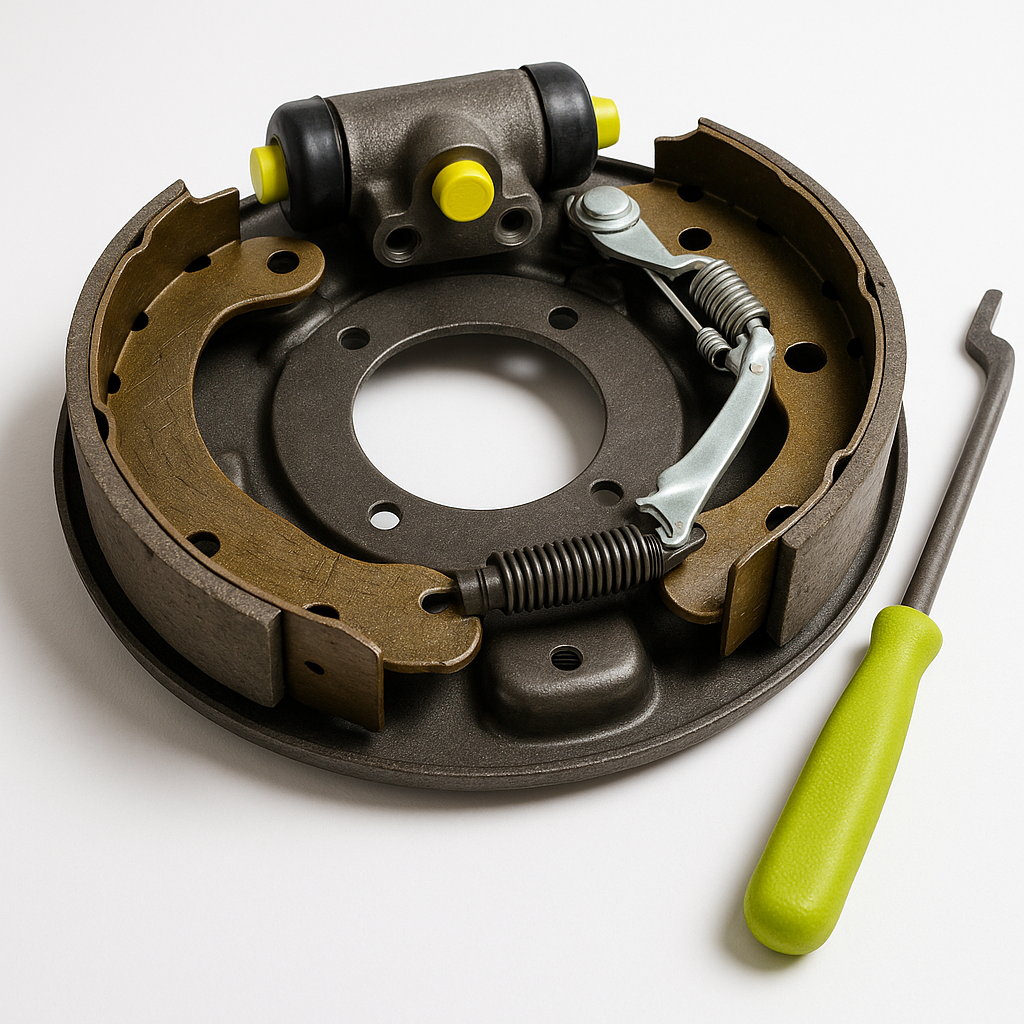
Brake noise on a golf cart is one of those problems people tend to ignore longer than they should. It starts as an occasional squeal at low speed, and before long it's a full metal-on-metal grind every time you slow down. Unlike a car, golf carts have relatively simple brake systems — which means diagnosis is usually straightforward if you know what to look for. This guide walks you through the most common causes, from the obvious to the easy-to-miss.
Squealing vs. Grinding: What the Sound Tells You
The type of noise narrows the problem fast. A high-pitched squeal that happens consistently when you apply the brakes usually means worn brake pads or shoes — many are designed with a metal wear indicator that makes exactly this sound when the friction material gets low. A grinding or scraping noise is more serious: it typically means the friction material is gone entirely and metal is contacting metal, or that debris has gotten lodged in the drum or near the rotor. A rhythmic clunking that pulses with wheel rotation (rather than appearing only when you squeeze the brakes) points toward something mechanical — a loose brake drum, a bent backing plate, or a drum that's out of round.
Start with a Visual Inspection
Before you pull anything apart, get eyes on the brake components. Jack up the rear of the cart safely and secure it on jack stands — never work under a cart supported only by a floor jack. Spin each rear wheel by hand and listen for scraping or feel for resistance. On drum brake setups (the most common configuration on golf carts), you won't be able to see the shoes without removing the drum, but you can often spot obvious problems: a cracked or heavily rusted drum, a dragging cable that isn't releasing fully, or a backing plate that's visibly bent or making contact with the drum. Also check whether the brake cable moves freely from end to end with no kinks or fraying.
Check Brake Shoe and Pad Condition
If nothing obvious shows up externally, the next step is pulling the drum. This usually requires removing the wheel and then the drum itself — some drums slide off freely, others may be stuck from rust and need persuasion with a rubber mallet. Once the drum is off, inspect the brake shoes. Look at the thickness of the friction material: if it's worn down close to the metal shoe, replacement is overdue. Also check for uneven wear — if one side of a shoe is worn significantly more than the other, the brake hardware (springs, adjusters, or the wheel cylinder on hydraulic systems) may not be distributing force evenly. Contaminated shoes — soaked in grease or brake fluid — won't generate friction properly and can also cause noise; these need to be replaced, not cleaned.
Inspect the Brake Drum
A worn or damaged drum is a common overlooked cause of brake noise. Run your finger around the inside braking surface — you're feeling for deep grooves, scoring, or a pronounced ridge at the outer edge where the shoes don't reach. Light surface rust that develops from sitting is usually fine and will clear itself after a few stops. Deep scoring or an obvious lip means the drum needs to be either machined flat by a brake shop or replaced. A drum that's out-of-round (warped or egg-shaped from heat) will cause a pulsing feel and noise that changes as the drum rotates — this requires machining or replacement as well.
Check the Brake Cable and Linkage
On most golf carts, the rear brakes are mechanically actuated by a cable running from the brake pedal to the rear axle. A cable that's frayed, kinked, or corroded inside its housing may not release fully after you let off the pedal — causing the shoes to drag against the drum constantly. Drag creates heat, wear, and noise. With the cart on jack stands, have a helper press and release the brake pedal while you watch the cable move at the rear axle. It should return fully to its resting position with no hesitation. Also check the equalizer bar (the crosspiece that splits tension to both rear wheels) — if it's bent or seized, one side may be applying more force than the other, causing uneven wear and noise on that wheel.
When to Replace vs. Adjust
Brake shoes and pads should be replaced in axle sets — both sides together — even if only one side is visibly worn. Mixing old and new friction material creates uneven braking force and can cause the cart to pull to one side. After installing new shoes, the rear drum brakes will need adjustment so the shoes are close enough to the drum to engage quickly but not so close they drag. Most golf cart drum brakes have a manual star wheel adjuster accessible through a slot in the backing plate. The general target is shoes snug enough that the drum spins with slight resistance and a light drag, then back off slightly so the drum spins freely. Always test braking at slow speed in a safe area before returning the cart to normal use.
If the Noise Persists After Servicing
If you've replaced shoes or pads, adjusted the brakes, and verified the drum is in good shape but the noise continues, dig deeper into the hardware. Weak or broken return springs let shoes sit partially engaged against the drum. A seized adjuster prevents the self-adjusting mechanism from working correctly. A loose or cracked brake drum can produce metallic noise even with good shoes. And on electric carts specifically, some motor-related noises can sound remarkably like brake noise — if the sound occurs during deceleration even without pressing the brake pedal, the motor or drivetrain may be the real source. When in doubt, a golf cart service technician can put it on a lift and trace the noise directly — brake problems are one area where getting it right matters.


